

...INDIE
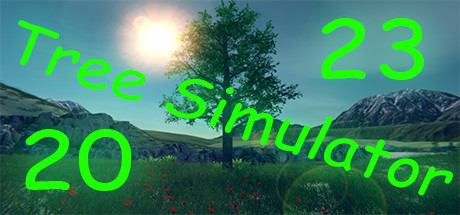
Tree Simulator 2023
It's exactly what it sounds like! Have you ever wanted to be a tree? Do you like odd numbers? How about multiplayer, weather, seasons and more!? Well then this is the game for you! Come on down to a place where you will never want to leaf. Relax and be the best tree you can be. 1-250 players.
Developer
Publisher
Release
April 1, 2022
4 years and 169 days ago
Steam Reviews
Overwhelmingly Positive809 reviews95.4%
Game contextLatest: IGF Team
| ContextThe evidence factors used to assess whether this game belongs on IndieGame.Fan. | Status | Notes Latest Contributor: IGF TeamEdit notes |
|---|---|---|
Updated: Jul 13, 2026Developer scaleThe operating scale of the game's developer. | ||
Updated: Jul 13, 2026Publisher scaleThe operating scale of the game's publisher. | A separate publisher is listed for this release. | |
Updated: Jul 13, 2026Release statusWhether and how the game has been released. | The game was released through a separate publisher. |
Media
6 itemsAbout the Game
It's that time! Its time to discover what it means to be a tree! Become a true work of art!
Every frame a painting, every tree an original masterpiece.
Be a tree alone or with friends online!
A lot went into 2023 so here is a breakdown of some of the features.
Be the best forest you can be! Invite up to 250 glorious trees to join your forest. You can host a server and set the amount of trees that can join along with passwords and making the lobby private. Servers that are public will appear in a lobby list when trees click "Join". If a server is private you will only be able to join if that person is on your friends list or by invite.
For transparency, multiplayer is tested with 4 trees, but it should support up to 250.
There is no built-in voice chat. It is recommended that Discord or Steam chat be used.
You can join a game in various ways:
Every frame a painting, every tree an original masterpiece.
Be a tree alone or with friends online!
A lot went into 2023 so here is a breakdown of some of the features.
Features
- Be a tree
- 3rd "person" camera
- Stretch your roots and move around.
- More cosmetic items similar to the "Red tie"
- Small handcrafted map now with a new area
- Select from 31 trees
- Many configurable tree settings
- Customizable weather system (Rain, Snow, Wind, Fog, Overcast)
- Day night cycle
- Seasons (As the seasons change, the trees appearance, weather, and environment will change)
- Save settings
- Multiplayer
- Server admin support
- Server browser that helps you easily connect with other players
- Private game support
- Password required servers (optional)
- Built in text based chat
- Halloween mode
- Christmas mode
- Ultra-wide monitor support
- Windowed support (a little wonky)
- Wallpaper engine support
- Xbox Controller support
- PS4 Controller Support
Multiplayer
Be the best forest you can be! Invite up to 250 glorious trees to join your forest. You can host a server and set the amount of trees that can join along with passwords and making the lobby private. Servers that are public will appear in a lobby list when trees click "Join". If a server is private you will only be able to join if that person is on your friends list or by invite.
For transparency, multiplayer is tested with 4 trees, but it should support up to 250.
There is no built-in voice chat. It is recommended that Discord or Steam chat be used.
You can join a game in various ways:
Host a game
- Host tree clicks "Host"
- Host tree configures various desired settings or leaves them as default (Server name, private, password required)
- Host tree clicks "Confirm"
Join a game from the menu
- Tree clicks "Join"
- Tree observes desired lobby in the list
- Tree clicks "Connect" on desired lobby
Join a game from an invite
- Host tree presses [Esc] on the keyboard
- Host tree clicks "Invite"
- Host tree uses invite dialog to invite other trees
- Other trees start Tree Simulator 2023
- Other trees press [Shift]+[Tab] to activate the Steam overlay
- Other trees click "Play Game" in the Steam chat window
Join a game from your friends list
- Tree observes friend tree playing Tree Simulator 2023
- Tree immediately tells everyone they know
- Tree starts Tree Simulator 2023
- Tree presses [Shift]+[Tab] to activate the Steam overlay
- Tree clicks "Join game" in the Steam overlay from their friends name
YouTube Videos
Most viewedNo videos are available for this game yet.
User Comments
Join the conversation in this game’s community chat.
