

...INDIE
RPGScenery
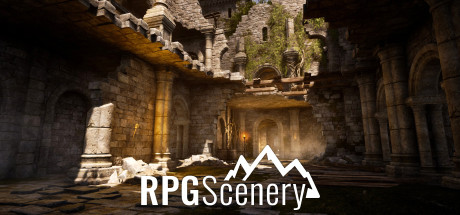
In the RPGScenery application, you can move around stunning live scenes explicitly created for TTRPG, change their weather in real-time, and switch to battlemap mode with one click.
Developer
Publisher
Release
January 27, 2022
4 years and 233 days ago
Steam Reviews
Mixed26 reviews53.8%
Game contextLatest: IGF Team
| ContextThe evidence factors used to assess whether this game belongs on IndieGame.Fan. | Status | Notes Latest Contributor: IGF TeamEdit notes |
|---|---|---|
Updated: Jul 10, 2026Developer scaleThe operating scale of the game's developer. | ||
Updated: Jul 10, 2026Publisher scaleThe operating scale of the game's publisher. | ||
Updated: Jul 10, 2026Publisher statusHow the game's publishing relationship is classified. | ||
Updated: Jul 10, 2026Release statusWhether and how the game has been released. |
Media
9 itemsAbout the Game
RPGScenery is a tool for pen and paper RPG game masters to help them visualize their stories and make the combat scenes more manageable.
In RPGScenery you are able to browse the released scenes, select the ones that fit the most of your campaigns and create playlists from them. You can support your stories by showing the players the locations where their adventures take place from various views or switch into map mode easily to simulate battles with the help of the customizable grid system.
Each scene is built in Unreal Engine 4 with stunning visuals and all of them are customizable which means that you can change the time and the weather by adjusting parameters like the amount of rain, snow, wind, fog, clouds, and time of the day in real-time.
RPGScenery not only provides participants with top-view battlemaps but is also a great tool for showing the scenes in 3D. With the pre-set cameras of each scene, GMs can view and show their players the surrounding from several angles. All the parameters set in the application are animated, including the weather, sunlight, and moonlight effects. Now the players can actually see the dark bushes swaying in wind, in the light of their campfire, or the scattered shine of the sun dancing on the surface of the flowing river they are planning to cross at the ford.
And when push comes to shove, the battle maps of the same scene tell them exactly how far they can move in a round, which enemy they can’t shoot at behind the rock, and tell the GM what their moves are going to be simply by pointing.
For more info please read our FAQ:
In RPGScenery you are able to browse the released scenes, select the ones that fit the most of your campaigns and create playlists from them. You can support your stories by showing the players the locations where their adventures take place from various views or switch into map mode easily to simulate battles with the help of the customizable grid system.
Each scene is built in Unreal Engine 4 with stunning visuals and all of them are customizable which means that you can change the time and the weather by adjusting parameters like the amount of rain, snow, wind, fog, clouds, and time of the day in real-time.
RPGScenery not only provides participants with top-view battlemaps but is also a great tool for showing the scenes in 3D. With the pre-set cameras of each scene, GMs can view and show their players the surrounding from several angles. All the parameters set in the application are animated, including the weather, sunlight, and moonlight effects. Now the players can actually see the dark bushes swaying in wind, in the light of their campfire, or the scattered shine of the sun dancing on the surface of the flowing river they are planning to cross at the ford.
And when push comes to shove, the battle maps of the same scene tell them exactly how far they can move in a round, which enemy they can’t shoot at behind the rock, and tell the GM what their moves are going to be simply by pointing.
For more info please read our FAQ:
YouTube Videos
Most viewedNo videos are available for this game yet.
User Comments
Join the conversation in this game’s community chat.
