

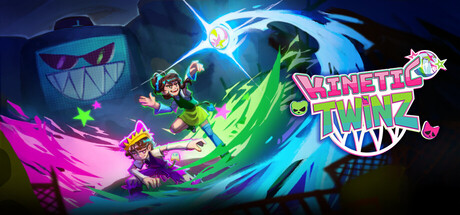
Kinetic TwinZ
In this Motion Control party game, turn volleyball into an act of defiance! Seize your Joy-Cons, dodge powerful attacks, and coordinate with your duo to defeat the "Anti-Fun" police. This game was created by students from the video game school ISART Digital as part of their final-year project.
Does this feel indie?
Vote based on whether this game feels indie to you. You can change your vote at any time. Results earn an IGF score after 10 accepted votes.| ContextThe evidence factors used to assess whether this game belongs on IndieGame.Fan. | Status | Notes Latest Contributor: IGF TeamEdit notes |
|---|---|---|
Media
11 itemsAbout the Game
Kinetic TwinZ is a student-made game created in around 40 days by ISART Digital students as part of their final-year project, giving them the opportunity to put their skills and learning into practice. We hope you enjoy the experience they have created for you!
-------------
Play together in local co-op using Joy-Cons and motion controls, where every movement matters.
In an abandoned gym, turn volleyball into a revolution as rebellious twins: Smash, pass, dodge, and coordinate your actions to survive your encounter with the anti-fun police and push back against a world that wants to shut down fun... forever.
The goal ? Defeat the ANTI-FUN POLICE
In a world where fun is forbidden, play the role of two rebellious teens who are determined to have a good time.
And how to do that, you might ask?
Passing the ball between both player charges it up! A fully charged ball will deal MAXIMUM damage to the boss!
Smash TOGETHER for a brilliant finish!
Set-up
Kinetic TwinZ requires Nintendo Switch Joy-Cons to play. The ideal experience uses the Switch's motion controls, but accessibility options are available for those who can't!
The initial set-up can be a little finicky, but the following advice should take you through any issues you might encounter:
On Windows:
Open Settings > Bluetooth & devices
Toggle Bluetooth on
If you have previously connected Joy-Cons:
Click on each Joy-con: (L) and (R)
Click "Remove"
This step is vital, as it is impossible to automatically or re-connect a disconnected Joy-Con on Windows.
Turn on your Joy-cons:
Press and hold the small, circular black button located in between SL and SR.
After 3 seconds the lights should start to flicker.
On Windows:
Add Device > Bluetooth > Joy-Con (L) and Joy-Con (R) individually
Open Steam
Click "Play"!
The whole team wishes you the best experience playing Kinetic TwinZ.
Frequently Asked Questions
I'm having connection issues, lag or the motion controls aren't working
You might be too far away from your PC. Distance can cause lag or disconnection of Nintendo Switch Joy-Cons.
Disconnecting and reconnecting your Joy-Cons tends to fix most issues. We recommend updating your Bluetooth drivers for the smoothest experience.
Can I play with Nintendo Switch 2 Joy-Cons?
Sadly, no. Nintendo Switch 2 Joy-Cons won't connect to a PC via Bluetooth, contrary to the first generation Joy-Cons. If this becomes possible we would love to ensure compatibility!
I don't have Joy-Cons. Can I play with a keyboard?
Technically it is possible to replace two Joy-Cons with a keyboard and a controller. We don't recommend you play like this, but if you want to experience Kinetic TwinZ and don't have any Joy-Cons, you can! Please note that the pictogrammes and other in-game signs will not reflect this.
