


Developer
Publisher
Release
July 15, 2024
2 years and 17 days ago
Steam Reviews
1 user reviews1 reviews100.0%
Does this feel indie?
Vote based on whether this game feels indie to you. You can change your vote at any time. Results earn an IGF score after 10 accepted votes.No votes yet
Game contextLatest: IGF Team
| ContextThe evidence factors used to assess whether this game belongs on IndieGame.Fan. | Status | Notes Latest Contributor: IGF TeamEdit notes |
|---|---|---|
Media
6 itemsAbout the Game
Kill The Lights! is a puzzle game where you toggle blocks in a particular pattern in hopes of turning them all off. Clicking one spot toggles on or off all the lights around it in a specific pattern like a "+" or "x". Relax and get your flow on by clicking blocks until all the lights are out in Normal mode. But if you're up for a challenge, take on the computer who turns on blocks while you're turning them off. With 6, yes, 6! difficulty modes, can you beat what is labeled as "Literally Impossible?"
In Kill the Lights! When you click on a block that block and all blocks around it, in a particular pattern, will toggle.
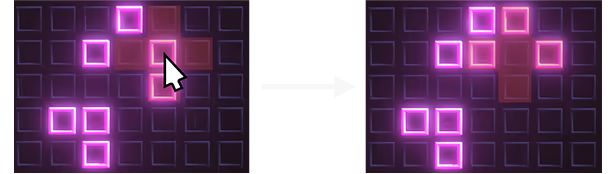
By clicking on the square in the middle of the example, the blocks to the left, above, and right turn on, while the middle and bottom turn off.
Each one provides a unique challenge. Can you beat them all?
You can play in two exciting Game Types, Arcade and Normal.
If you're up for the challenge (I dare you), you can take on the computer in various difficulty levels ranging from "Very Easy" to "Literally Impossible." At your disposal though are three purchasable special moves.
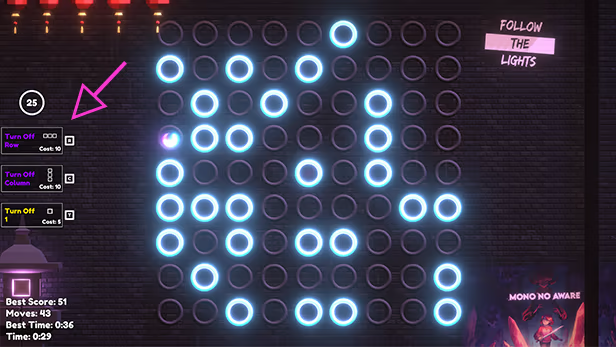
As you play you will gain up to 25 moves to spend on these specials. How many moves will it take you to beat the computer? I dunno, you're just gonna have to find out!
Note that 50% of all profit will be donated to various Environmental Organizations
How Blocks Work:
In Kill the Lights! When you click on a block that block and all blocks around it, in a particular pattern, will toggle.
By clicking on the square in the middle of the example, the blocks to the left, above, and right turn on, while the middle and bottom turn off.
Shapes:
There are 4 different shape puzzles.- Plus
- X
- Plus Across The Board
- X Across The Board
Each one provides a unique challenge. Can you beat them all?
Game Types
You can play in two exciting Game Types, Arcade and Normal.
- Arcade - The devilish computer explodes bombs in all kinds of shapes to keep you from turning everything out
- Normal - Relax (kinda) and try to turn off all the lights without any evil interruptions.
Arcade Mode
If you're up for the challenge (I dare you), you can take on the computer in various difficulty levels ranging from "Very Easy" to "Literally Impossible." At your disposal though are three purchasable special moves.
- Turn Off Row - Turns off all blocks in a single row
- Turn Off Column - Turns off all blocks in a single column
- Toggle 1 - Toggles 1 block on or off
As you play you will gain up to 25 moves to spend on these specials. How many moves will it take you to beat the computer? I dunno, you're just gonna have to find out!
