

Handy Machines VR
Send the balls into the hat. You can go through the levels or create your own ways according to your ideas.
Developer
Publisher
Release
September 30, 2020
5 years and 306 days ago
Steam Reviews
2 user reviews2 reviews100.0%
Does this feel indie?
Vote based on whether this game feels indie to you. You can change your vote at any time. Results earn an IGF score after 10 accepted votes.No votes yet
Game contextLatest: IGF Team
| ContextThe evidence factors used to assess whether this game belongs on IndieGame.Fan. | Status | Notes Latest Contributor: IGF TeamEdit notes |
|---|---|---|
Media
8 itemsAbout the Game
Now it is known to everyone. The balls belong into the hat.
So let's go. The game Handy Machines VR contains two modes:
Fungamesvr team.
(If you buy the game, please let others know whether you recommend it. Thanks)
So let's go. The game Handy Machines VR contains two modes:
- Gradually go through the LEVELS
The first levels have low difficulty. It is easy to understand how to play. Grab the part with your hand and position it to create the way for the ball. If necessary, place more parts. Then press the START button on the left hand with your right finger. The balls will gain gravity and roll around your path. If you can't get all the balls into the hats, press RESET and you will be able to adjust your track. After passing the level, the next level is automatically loaded. Because you may not to be able to pass some a level, the system will unlock 20 percent more levels than you pass. For example, after completing 10 levels, you already have 12 levels available to play.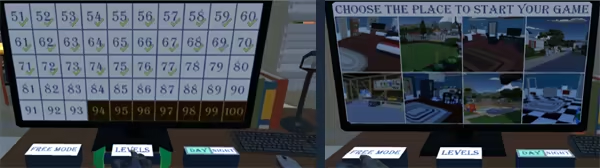
- Your own creation - FREE MODE
In this mode, you have all the locations for playing and all parts available, both active and passive in any number. You can also create balls and hats and play freely with them. After pressing the PARTS button on the left hand, the parts menu is displayed. Touch them with the right finger to create the selected part. Other parts and objects are displayed after pressing the NEXT button. Unnecessary parts can be erased and the whole scene can be stored in 12 slots. In this game mode, the ball reappears in its original place after it has disappeared into the hat. When using the bin, the ball disappears permanently. A special feature is the ball generator, which can be set to automatically generate balls at different intervals.
Fungamesvr team.
(If you buy the game, please let others know whether you recommend it. Thanks)
