

...INDIE
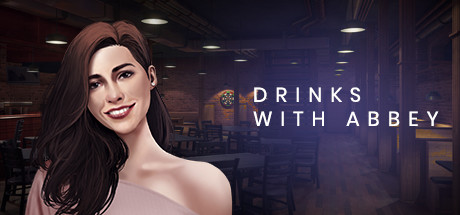
Drinks With Abbey
Drinks with Abbey is a short, slice-of-life visual novel about a first date.
Developer
Publisher
Release
December 25, 2019
6 years and 311 days ago
Steam Reviews
Mostly Positive399 reviews78.9%
Game contextLatest: IGF Team
| ContextThe evidence factors used to assess whether this game belongs on IndieGame.Fan. | Status | Notes Latest Contributor: IGF TeamEdit notes |
|---|---|---|
Updated: Jul 12, 2026Developer scaleThe operating scale of the game's developer. | ||
Updated: Jul 12, 2026Publisher scaleThe operating scale of the game's publisher. | ||
Updated: Jul 12, 2026Publisher statusHow the game's publishing relationship is classified. | ||
Updated: Jul 12, 2026Release statusWhether and how the game has been released. |
Media
6 itemsAbout the Game
Drinks with Abbey is a short, slice-of-life visual novel about a first date, from a male's perspective. After connecting with Abbey on a dating app, you meet in person for the first time at a local bar.
This game is simply a conversation with her and the choices you make about what to say and do. But don't expect the date to go well on the first try. You need to pay attention, and as things are revealed about Abbey, you will be able to make better choices next time.
Drinks with Abbey is my first game. I wanted to make a similar, larger game, with more resources put into it, but I wasn't sure what people would think of the style, because it's different than most existing visual novels. I thought it was important to get feedback on a scaled-down version first, to give the general sense of the larger game, but not do everything I'd like to with it (that's why it's free to play). If you are willing to give feedback, please be specific so I know what to do more/less of in the next game.
There are no menus, except when you click the X to quit. You can click the textbox/choices to advance or use the arrow keys + spacebar. You can also press F to enter fullscreen mode. The 5 icons shown in the bottom left of the screen are the game's only options:
1. Toggle between speaker and headphones modes. Speaker mode is intended to sound like it's being played in the bar and includes crowd noise, while headphones mode plays the music as it was recorded.
2. Toggle music on and off.
3. Toggle lightning mode, which just removes the typing effect.
4. Toggle auto-play mode. This mode only requires your input for choices.
5. Toggle skip mode. When on, you will fast forward through all previously seen content.
This game is simply a conversation with her and the choices you make about what to say and do. But don't expect the date to go well on the first try. You need to pay attention, and as things are revealed about Abbey, you will be able to make better choices next time.
- 15 to 30 min playthrough, better choices = longer date.
- Realistic art style and atmosphere, based on western culture.
- Dry/subtle style of humor used between the characters (think Jim & Pam from The Office). Important to keep this in mind to avoid misinterpreting the conversation.
- Text-based game. If you don't like reading, beware.
- No saving or roll-back, but you can skip previously seen content.
A prototype game
Drinks with Abbey is my first game. I wanted to make a similar, larger game, with more resources put into it, but I wasn't sure what people would think of the style, because it's different than most existing visual novels. I thought it was important to get feedback on a scaled-down version first, to give the general sense of the larger game, but not do everything I'd like to with it (that's why it's free to play). If you are willing to give feedback, please be specific so I know what to do more/less of in the next game.
Interface
There are no menus, except when you click the X to quit. You can click the textbox/choices to advance or use the arrow keys + spacebar. You can also press F to enter fullscreen mode. The 5 icons shown in the bottom left of the screen are the game's only options:
1. Toggle between speaker and headphones modes. Speaker mode is intended to sound like it's being played in the bar and includes crowd noise, while headphones mode plays the music as it was recorded.
2. Toggle music on and off.
3. Toggle lightning mode, which just removes the typing effect.
4. Toggle auto-play mode. This mode only requires your input for choices.
5. Toggle skip mode. When on, you will fast forward through all previously seen content.
YouTube Videos
Most viewedNo videos are available for this game yet.
User Comments
Join the conversation in this game’s community chat.
