

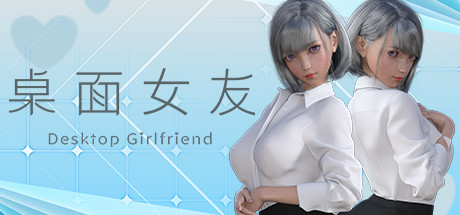
Desktop Girlfriend
Desktop Girlfriend is a desktop interactive girlfriend game that allows users to interact with their virtual girlfriend in various ways, such as interactive games, customizing her hairstyle, hair color, and more.
Developer
Publisher
Release
August 23, 2022
3 years and 344 days ago
Steam Reviews
Mostly Positive725 reviews71.4%
Does this feel indie?
Vote based on whether this game feels indie to you. You can change your vote at any time. Results earn an IGF score after 10 accepted votes.No votes yet
Game contextLatest: IGF Team
| ContextThe evidence factors used to assess whether this game belongs on IndieGame.Fan. | Status | Notes Latest Contributor: IGF TeamEdit notes |
|---|---|---|
Updated: Jul 13, 2026Developer scaleThe operating scale of the game's developer. | ||
Updated: Jul 15, 2026Publisher scaleThe operating scale of the game's publisher. | ||
Updated: Jul 15, 2026Publisher statusHow the game's publishing relationship is classified. | ||
Updated: Jul 13, 2026Release statusWhether and how the game has been released. |
Media
8 itemsAbout the Game
Desktop Girlfriend is a desktop interactive girlfriend game that allows users to interact with their virtual girlfriend in various ways, such as interactive games, customizing her hairstyle, hair color, and more. Desktop Girlfriend is a faithful girlfriend who loves the user, she will always be with the user, so that the user does not feel alone. In addition, the game plans to support steam workshop, which allows users to make and upload their own kind of girlfriend and all kinds of animations, making the game even richer!
Features.
-Custom hair and hair color
-Customize nail color
-Custom scene lighting colors
--6 different endings of the plot play
-2 mini-games
-Characters and clothes with physics effects
-Realistic eye system
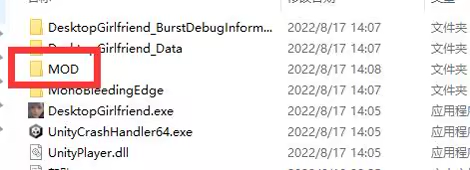
As shown in the picture above, all the mod's teaching content and tools are contained in this folder, please read it carefully.
Win7
Click the system icon at the bottom left corner of the desktop - Control Panel - System and Security - System - Advanced System Settings - Advanced - Performance - Settings, check [Aero] and [Clear Glass], then click [Adjust to Best Appearance], after that click [OK]
Win10
Open [DVIDIA Control Panel] - [Manage 3D Settings], find [Multi-Frame Sampling AA (MFAA)] and [Smooth Processing - FXAA] and change these two options to [Off]
If the above method still does not solve the problem, please try the following general method
1. Restart the computer
2. Desktop right mouse button - personalization - color - turn on the transparency effect
3. Go to the official website of the graphics card to download the latest graphics card driver, the installation process select "custom installation" > check the "clean install" , you can not use the default override upgrade installation
Features.
-Custom hair and hair color
-Customize nail color
-Custom scene lighting colors
--6 different endings of the plot play
-2 mini-games
-Characters and clothes with physics effects
-Realistic eye system
【Steam Workshop】
[Mod Teaching]
Open the steam client, enter the game library, right-click the game icon -> Manage -> browse local files. Open the game installation directory.As shown in the picture above, all the mod's teaching content and tools are contained in this folder, please read it carefully.
【What should I do if I can't play the game? ]
Can not run the game normally, has been stuck in the loading interface, the character background becomes black and can not see the desktop solutionWin7
Click the system icon at the bottom left corner of the desktop - Control Panel - System and Security - System - Advanced System Settings - Advanced - Performance - Settings, check [Aero] and [Clear Glass], then click [Adjust to Best Appearance], after that click [OK]
Win10
Open [DVIDIA Control Panel] - [Manage 3D Settings], find [Multi-Frame Sampling AA (MFAA)] and [Smooth Processing - FXAA] and change these two options to [Off]
If the above method still does not solve the problem, please try the following general method
1. Restart the computer
2. Desktop right mouse button - personalization - color - turn on the transparency effect
3. Go to the official website of the graphics card to download the latest graphics card driver, the installation process select "custom installation" > check the "clean install" , you can not use the default override upgrade installation
