

...INDIE
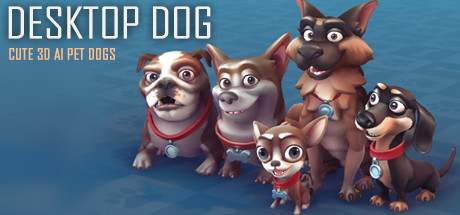
Desktop Dog
Living AI cartoon pet dogs on your desktop, they will always be with you, even while playing game or browsing the web. Play and feed with them and feel the warm interaction from pets.
Developer
Publisher
Release
April 7, 2022
4 years and 207 days ago
Steam Reviews
Positive48 reviews81.3%
Game contextLatest: IGF Team
| ContextThe evidence factors used to assess whether this game belongs on IndieGame.Fan. | Status | Notes Latest Contributor: IGF TeamEdit notes |
|---|---|---|
Updated: Jul 11, 2026Developer scaleThe operating scale of the game's developer. | ||
Updated: Jul 11, 2026Publisher scaleThe operating scale of the game's publisher. | ||
Updated: Jul 11, 2026Publisher statusHow the game's publishing relationship is classified. | ||
Updated: Jul 11, 2026Release statusWhether and how the game has been released. |
Media
16 itemsAbout the Game
Living cute AI cartoon pet dogs on your desktop, they will always be with you, even while playing game or browsing the web. Play and feed with them and feel the warm interaction from happy pets.
Features
- Special AI-Engine for cute cartoon pet dogs, lots of Interactive animations, gives your desktop some life.
- Support interacte animation with mouse cursor.
- Support Alarm list.
- Support chat with Steam friends.
- Support act on top of other windows (Optional).
- Support Steam Workshop, Share and download dog styles.
- Compatible with all other software and live wallpapers.
- Supports taskbar transparency and blur.
- Lightweight rendering engine with less resource usage.
- Support Multi-Languauge
- Supports Windows 7 (with Aero), 8, 8.1 and 10 / 11
Tips
- Dog snores when sleeping (turn up the volume to hear it)
- Dogs walk with footprints on the screen and kick up dust
- Dogs likes to accompany you to do things and will stare when the mouse moves in front
- If you click on the dog, it will pretend to be frightened and bark
- Press and hold the left mouse button on the dog, you can drag it left and right, or you can drag the dog into the air
- The middle mouse button scroll wheel on the dog, you can adjust the size of the dog
- Right-click on the dog to pop up the circular menu
YouTube Videos
Most viewedNo videos are available for this game yet.
User Comments
Join the conversation in this game’s community chat.
