

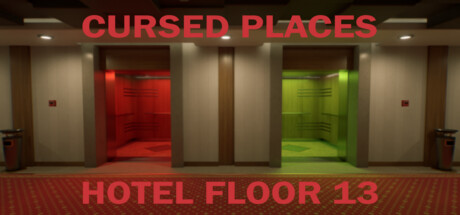
Cursed Places: Hotel Floor 13
Cursed Places: Hotel Floor 13 is an observation game where you are trapped on the Cursed Floor 13. Reach the first floor to escape from this cursed endless loop
Developer
Publisher
Release
May 16, 2024
2 years and 78 days ago
Steam Reviews
Positive17 reviews88.2%
Does this feel indie?
Vote based on whether this game feels indie to you. You can change your vote at any time. Results earn an IGF score after 10 accepted votes.No votes yet
Game contextLatest: IGF Team
| ContextThe evidence factors used to assess whether this game belongs on IndieGame.Fan. | Status | Notes Latest Contributor: IGF TeamEdit notes |
|---|---|---|
Media
6 itemsAbout the Game
You are unlucky resident of the Hotel's Cursed Floor 13. Reach 1st Floor and escape from this endless cursed loop.
- Look for Anomalies
- If you find an anomaly use Red Elevator
- If Floor has no anomalies use Green Elevator
- Reach 1st Floor to escape from Cursed Floor 13
Cursed Places: Hotel Floor 13 is a short walking simulator inspired by Exit 8. Game is available only in English.
Play Time
15-60 minutes
Option
Graphics settings, mouse sensitivity and other settings can be configured from the options.
If you are easily intoxicated, changing the following settings may help.
【Camera Sensitivity】
If the sensitivity is high, the camera will move significantly when the mouse is moved.
Adjust the value if you find it difficult to operate the camera. The default value is 50.
【Preset】
Set the overall graphic settings.
If you do not have sufficient specs, it is better to set it to "Low" to avoid lags.
- Look for Anomalies
- If you find an anomaly use Red Elevator
- If Floor has no anomalies use Green Elevator
- Reach 1st Floor to escape from Cursed Floor 13
Cursed Places: Hotel Floor 13 is a short walking simulator inspired by Exit 8. Game is available only in English.
Play Time
15-60 minutes
Option
Graphics settings, mouse sensitivity and other settings can be configured from the options.
If you are easily intoxicated, changing the following settings may help.
【Camera Sensitivity】
If the sensitivity is high, the camera will move significantly when the mouse is moved.
Adjust the value if you find it difficult to operate the camera. The default value is 50.
【Preset】
Set the overall graphic settings.
If you do not have sufficient specs, it is better to set it to "Low" to avoid lags.
