

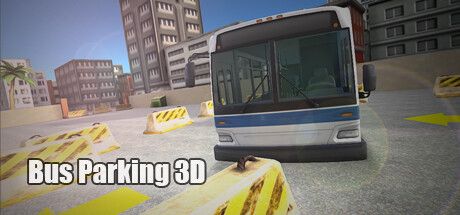
Bus Parking 3D
Park something bigger. In this legendary Bus Game, you will drive and park different buses.
Developer
Publisher
Release
October 21, 2022
3 years and 286 days ago
Steam Reviews
3 user reviews3 reviews66.7%
Does this feel indie?
Vote based on whether this game feels indie to you. You can change your vote at any time. Results earn an IGF score after 10 accepted votes.No votes yet
Game contextLatest: IGF Team
| ContextThe evidence factors used to assess whether this game belongs on IndieGame.Fan. | Status | Notes Latest Contributor: IGF TeamEdit notes |
|---|---|---|
Media
8 itemsAbout the Game
The Legend is now on Steam.
More than 10 million downloads in Android platform and rated above 4.0
If you like Bus Games, you should definitely try this game.
In this legendary Bus Game, you will drive and park different buses.
- Park a Coach Bus, City Bus and School Bus
- Realistic controls and challenging levels.
- Different gameplay modes: Classic and Relax
Features of Bus Parking 3D:
- Side Mirrors
- Realistic Bus sound effects
- Realistic Bus physics
- Easy controls
- HD Graphics
- Family friendly
Controls:
W/Up Arrow: Accelerate
S/Down Arrow: Brake/Drive backwards
A/Left Arrow: Steer Left
D/Right Arrow: Steer Right
X: Handbrake
Also drag mouse on visual Steering Wheel: Steering
While first(default) camera is active, drag mouse on the center of the screen to rotate camera and change view.
More than 10 million downloads in Android platform and rated above 4.0
If you like Bus Games, you should definitely try this game.
In this legendary Bus Game, you will drive and park different buses.
- Park a Coach Bus, City Bus and School Bus
- Realistic controls and challenging levels.
- Different gameplay modes: Classic and Relax
Features of Bus Parking 3D:
- Side Mirrors
- Realistic Bus sound effects
- Realistic Bus physics
- Easy controls
- HD Graphics
- Family friendly
Controls:
W/Up Arrow: Accelerate
S/Down Arrow: Brake/Drive backwards
A/Left Arrow: Steer Left
D/Right Arrow: Steer Right
X: Handbrake
Also drag mouse on visual Steering Wheel: Steering
While first(default) camera is active, drag mouse on the center of the screen to rotate camera and change view.
