

Bear Football
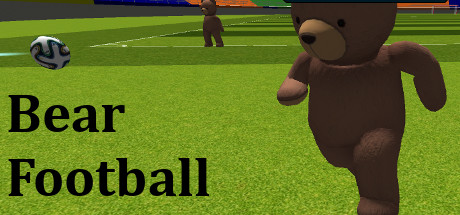
Bear Football is a third person view bear football simulation game. The player controls teddy bear, score a goal by pushing it into the goal.
Developer
Publisher
Release
July 30, 2017
9 years and 5 days ago
Steam Reviews
Mostly Positive140 reviews71.4%
Does this feel indie?
Vote based on whether this game feels indie to you. You can change your vote at any time. Results earn an IGF score after 10 accepted votes.No votes yet
Game contextLatest: IGF Team
| ContextThe evidence factors used to assess whether this game belongs on IndieGame.Fan. | Status | Notes Latest Contributor: IGF TeamEdit notes |
|---|---|---|
Updated: Jul 14, 2026Developer scaleThe operating scale of the game's developer. | ||
Updated: Jul 14, 2026Publisher scaleThe operating scale of the game's publisher. | ||
Updated: Jul 14, 2026Publisher statusHow the game's publishing relationship is classified. | ||
Updated: Jul 14, 2026Creative controlWho appears to retain creative control of the game. | ||
Updated: Jul 14, 2026Release statusWhether and how the game has been released. |
Media
13 itemsAbout the Game
Bear Football is a third person view bear football simulation game.
The player controls teddy bear, score a goal by pushing it into the goal.
Bear Actions:Slide, Vaut, Sprint.
Action Slide: the default keyboard button is "E". Press the button, the teddy bear will slide a distance.
Action Vaut:the default keyboard button is "R". Press the button, the teddy bear will vaut.
Action Sprint:the default keyboard button is "Space". Press the button, the teddy bear will storage capacity, then release the button, the teddy bear will sprint a distance.
Game Mode:Single Player and Co-op.
Single Player:
When the game start, the player control the teddy bear, push the football to red goal by against a NPC bear. The player Each gets five goals, the game will create one more NPC bear. There will be at most five bears. The player can restart the game anytime.
Local Co-op:
The player can choose to build a Master Server / LAN Game or connect to a server by other player as a client.
Before start/join a Co-op game, the player can choose red/blue team.
Only the player who build Master Server can restart the Co-op game.
The player controls teddy bear, score a goal by pushing it into the goal.
Bear Actions:Slide, Vaut, Sprint.
Action Slide: the default keyboard button is "E". Press the button, the teddy bear will slide a distance.
Action Vaut:the default keyboard button is "R". Press the button, the teddy bear will vaut.
Action Sprint:the default keyboard button is "Space". Press the button, the teddy bear will storage capacity, then release the button, the teddy bear will sprint a distance.
Game Mode:Single Player and Co-op.
Single Player:
When the game start, the player control the teddy bear, push the football to red goal by against a NPC bear. The player Each gets five goals, the game will create one more NPC bear. There will be at most five bears. The player can restart the game anytime.
Local Co-op:
The player can choose to build a Master Server / LAN Game or connect to a server by other player as a client.
Before start/join a Co-op game, the player can choose red/blue team.
Only the player who build Master Server can restart the Co-op game.
